
How to Update Swap Rates Across Multiple MT4/MT5 Servers
Share this article
To update swap rates across multiple MT4/MT5 servers, you need a bulk update workflow that pushes changes across all connected servers simultaneously rather than updating each symbol individually. Symbol-by-symbol updates across multiple servers create inconsistencies that compound over time and are rarely caught until they surface in reconciliation or a compliance review.
The problem is not isolated to large brokers. Any operations team managing more than one MT4/MT5 server faces the same challenge, commonly seen with mt4 multi server management. Each rate change event, whether from a central bank decision or an LP update, requires the same values to land on every server at the same time. For operations teams, every mt4 swap rate update must be applied consistently across servers to avoid pricing discrepancies. When that does not happen consistently, the gaps between servers become a liability.
This article covers where that process breaks down, what errors it creates downstream, and how a systematic bulk swap update across MT4/MT5 solves it.
Why Swap Rate Management Across Multiple MT4/MT5 Servers Is an Ops Problem
Swap rates are not a set-and-forget configuration. Brokers therefore run a recurring mt4 swap rate update cycle whenever market conditions or liquidity provider terms change. They move with central bank decisions, liquidity provider pricing changes, and internal broker policy updates. For an ops team managing multiple MT4/MT5 servers, each of these events triggers a review and update cycle.
The frequency is what makes this operationally significant. A broker running three live servers with 300 symbols is not dealing with a one-time setup task. They are dealing with a recurring operational requirement that compounds with every server added to the estate.
MT4/MT5 swap rate updates symbol-by-symbol across multiple servers is where most ops teams lose hours, they cannot account for. Without the right MT4 Plugins for Brokers, these recurring update cycles quickly become unmanageable as server count and symbol complexity grow. There is a better operational approach, and it starts with understanding how MT4/MT5 server operations work at scale.
Common Errors When Swap Rates Are Not Updated Consistently Across MT4/MT5 Servers
Before looking at how bulk swap updates in MT4/MT5 works, it is worth being specific about what goes wrong when the process is inconsistent. These are the errors that create downstream problems in reconciliation, client reporting, and compliance reviews.
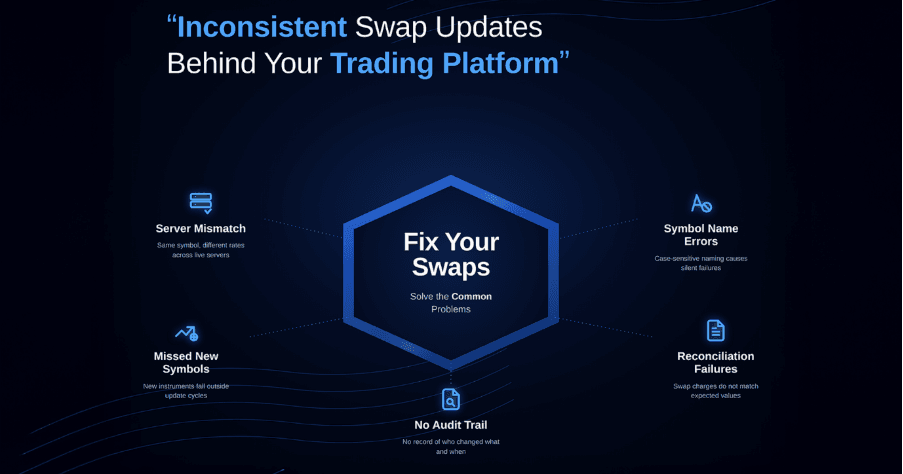
Server-to-server mismatch: The same symbol carries different swap values across your live servers. This happens when updates are applied to one server and missed on another. Clients on different servers are charged differently for holding the same position overnight. This is both an operational inconsistency and a potential regulatory issue.
Symbol name discrepancy errors: MT4/MT5 servers are case-sensitive and configuration-specific. A symbol named EURUSD on one server may be EURUSDpro on another. Update processes that do not account for this produce failed or misapplied changes with no clear error record.
Newly added symbols missed in update cycles: When new instruments are added to the server, they often fall outside the existing update routine. Swap rates for new symbols can sit at default or incorrect values for extended periods without anyone flagging it.
Reconciliation failures downstream: When swap charges applied to client accounts do not match expected values, the reconciliation process breaks. Finance teams spend time tracing discrepancies that originate from an inconsistent server-level configuration.
No audit record of changes: Terminal edits do not produce a compliance-ready audit trail. If a regulator or internal auditor asks who changed a swap value, when, and on which server, the answer from a manual process is often incomplete or unavailable.
These are not edge cases. They are predictable outcomes of a swap management process that has not been systematized. These issues highlight why brokers increasingly rely on the Best MetaTrader Plugins to standardize operations and reduce risk across multiple servers.
How Bulk Swap Updates Work Across MT4/MT5 Servers
The core principle of bulk swap update is straightforward. This is where mt4 swap automation becomes essential for brokers managing several trading servers. Rather than opening each symbol individually across each server, you define all your swap values in a single structured file and push changes to every connected server in one operation. This approach is commonly implemented using MT4/MT5 Plugins for Brokers designed specifically for multi-server environments.
For broker operations teams running this at scale, FYNXT TradeOps Control Center is built specifically around this workflow The MT5 and MT4 Swaps Updater for brokers manages the distribution of changes across your server estate through a centralized portal.
The plugin uses a predefined template where your team populates the relevant swap values for each symbol and server. Changes apply to the server in real time once processing completes, with no terminal session required on any connected server.
What the Bulk Swap Update Process Looks Like in Practice
The MT4/MT5 Swaps Updater follows the same pattern used across all bulk operation plugins in TradeOps. The typical flow is:
- Download the current predefined template
- Populate the swap values for the relevant symbols and servers
- Upload the completed file and initiate processing
Once processing runs, the portal pushes changes to each connected MT4/ MT5 servers. The Output file generated after each operation gives you a downloadable record of the full batch at row level. This is your operational proof of what was applied, when, and by whom. This structured workflow is a standard feature across modern MT4 Plugins for Brokers built for operational scalability.
Best Practices for Managing Swap Rate Updates Across MT4/MT5 Servers
Verify symbol names against each server before populating your update file: Symbol naming conventions vary across servers. The Symbols List in TradeOps shows all symbols configured on each connected server, making it straightforward to confirm the exact naming before populating your update file.
Apply swap updates to your demo server before pushing to live: Running the bulk swap update on your demo server first is the safest way to catch value errors before they reach live accounts. Both server types are connected in the same portal, so this adds no additional overhead.
Align your update cycle with central bank decision calendars: Swap reviews should be prepared before a rate decision, not after. A standing schedule around known macro event dates mean your update file is ready to process within hours of an announcement.
Treat the Output File as a compliance document: TradeOps generates a timestamped, user-attributed record of every operation. Storing the Output File alongside your trade operations records gives you a complete audit trail without any additional documentation effort.
Do not modify the template structure: The predefined template is validated on import. Download a fresh template for each cycle and populate the swap values within the existing structure.
Brokers using the Best MetaTrader Plugins can automate many of these best practices, reducing reliance on manual oversight.
Taking MT4/MT5 Swap Management Further
Swap updates are one operation within the broader MT4/MT5 symbol management layer. Many brokers also integrate this workflow with mt4 group settings automation to manage trading conditions across account groups. If your team is handling swap reviews regularly, they are likely also managing session times, filtration settings, and symbol-level calculation parameters. All of these follow the same bulk swap update pattern in TradeOps.
Brokers managing multiple MT4/MT5 servers are often surprised by how much of their back-office workflow can be systematised with the right MT4/MT5 tools built for broker operations.
If your team is ready to move swap rate management off the terminal and into a centralised, auditable web-based UI, TradeOps Control Center is the natural place to start.
Frequently Asked Questions
Can I update swap rates for all symbols across all servers in a single upload?
Yes. The template supports multiple MT4/MT5 servers within a single file. One upload can cover your entire server estate, with each row specifying its target server.
What happens if a symbol name in my file does not match the server?
That row will fail and appear as an error in Import Logs. The remaining valid rows still process. The Output File shows which rows failed so you can correct and resubmit only those entries.
Do swap changes apply immediately or at the next rollover?
Changes apply to the server in real time once the import completes. The updated swap values are active for positions rolled over after the change is processed.
What are MT4/MT5 plugins for brokers?
MT4/MT5 Plugins for Brokers are specialized tools that extend MetaTrader functionality, enabling bulk operations, automation, and centralized control across multiple servers.
Can I set different swap values for the same symbol across different account groups?
Swap values set at the symbol level apply across the server. Group-level differentiation for swap costs requires separate symbol configurations or group-level securities settings rather than the MT4/MT5 Swaps Updater.
How do I handle partial batch failures?
Failed rows are logged individually in Import Logs with an error reason. Successful rows are already applied and do not need to be resubmitted. Correct the failed rows and run a targeted resubmission covering only those entries.
How do I maintain an audit record of swap rate changes for compliance purposes?
Every import operation is logged with a timestamp and user attribution. The Output File provides row-level detail of what was applied. Retaining both the Import Log entry and the Output File for each update cycle gives you a complete audit record without any additional documentation effort.